Published November 29, 2025
Getting Better Results From Creative Image Prompts
The Secret to "Wow": How to Write Better Creative Image Prompts
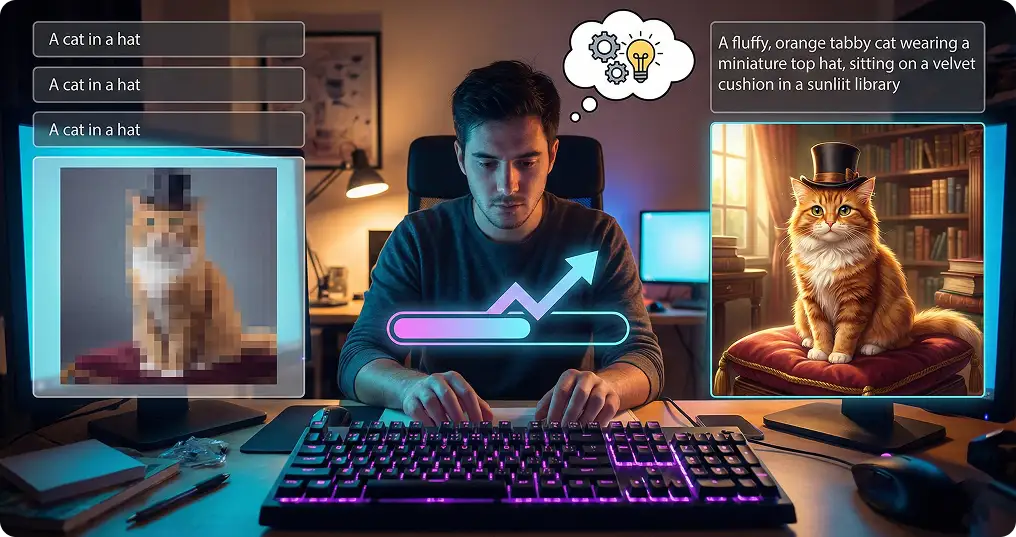
AI image generation has opened a world of possibilities for creators, marketers, designers, and hobbyists. It allows anyone to turn ideas into visuals instantly. But if you have tried generating images yourself, you may have noticed that results are not always perfect. Sometimes the output does not match your vision, details are off, or the style feels inconsistent. The difference between a generic image and one that truly captures your idea often comes down to how you craft your prompts. In this post, we will go step by step through everything you need to know to get better results from creative image prompts.
Understand What You Want Before Writing Your Prompt
Before typing anything into the AI, clearly define your goal. Ask yourself:
What is the subject of the image? A person, a product, or an abstract idea?
What style should the image have? Realistic, cartoon, minimal, cinematic, or abstract?
What mood or feeling should the image convey? Calm, energetic, dramatic, playful?
What is the intended use? Social media, marketing, presentation, or concept art?
Knowing these details makes it easier to communicate your vision to the AI. A vague prompt like “cat on a chair” will produce results, but a detailed prompt like “a tabby cat sitting on a vintage leather armchair, in a sunlit room, realistic style, warm tones” produces much more accurate results.
Be Specific With Descriptions
AI models respond better to specificity. Include details such as:
Colors: primary colors, background colors, or color tones
Lighting: natural sunlight, soft indoor lighting, dramatic shadows, or neon lights
Perspective: close-up, aerial view, wide shot, or side view
Composition: placement of objects, symmetry, depth, foreground and background elements
Texture and Detail: smooth surfaces, rough textures, glossy finishes, or detailed patterns
For example, instead of a vague prompt like “coffee cup,” try “white ceramic coffee cup on a wooden table, steam rising, morning sunlight through a window, soft shadows, realistic style.” The second prompt gives the AI a clear structure to work with, producing a more satisfying image.
Use References and Style Guides
Referencing styles, artists, or genres can improve results:
Specify a style like “digital painting,” “watercolor,” “pixel art,” or “photorealistic
Reference famous artists or designers to guide aesthetics, such as “in the style of Van Gogh” or “inspired by Studio Ghibli”
Specify era or genre if relevant, like “1920s Art Deco poster” or “futuristic cyberpunk cityscape”
These references help the AI understand the visual language you want. Without them, the model may produce generic outputs.
Iterate and Refine
Rarely will the first generated image perfectly match your vision. Iteration is key:
- Generate a set of images from your prompt
- Analyze what works and what does not. Are colors correct? Is the composition accurate? Is the style consistent?
- Adjust your prompt based on your observations. Add details, clarify ambiguities, or remove unnecessary instructions
- Repeat until the output aligns with your vision
Iteration is part of the creative process, like sketching multiple drafts before completing a painting.
Enhance Your Prompts With Soloa
One way to speed up iteration is using Soloa’s Enhance Prompt feature. This tool automatically improves your original prompt by adding clarity, detail, and style suggestions. It ensures the AI fully understands your vision and can dramatically improve the quality and creativity of your generated images. If you are unsure how to write the perfect prompt, you can also use Soloa’s AI Assistant to generate prompts for you. Simply describe your idea in natural language, and the AI will suggest detailed, optimized prompts ready for image generation. This is especially useful for beginners or anyone looking to save time while still achieving professional results.
Practice Makes Perfect
Like any skill, prompt crafting improves with practice. Over time, you will learn:
- Which words lead to certain visual effects
- How AI interprets specific adjectives and instructions
- How to balance detail and brevity in prompts
- How to iterate efficiently to save time
Keeping a library of successful prompts can help you recreate or adapt visuals in the future.
Final thoughts
Getting better results from creative image prompts is a combination of preparation, specificity, iteration, and smart use of AI enhancement tools. Start by clearly defining your vision, provide detailed instructions, reference styles when needed, and iterate until the output matches your goal. With Soloa’s Enhance Prompt feature and AI Assistant, you can craft high-quality prompts quickly and accurately. Combined with Soloa’s image generation tools, this ensures your ideas are transformed into visually stunning images faster and more consistently than ever before.
Related posts
See all posts