Published November 29, 2025
How to Restore and Colorize Old Family Photographs with AI
Learn how to turn faded, scratched, and black-and-white photos into vibrant, full-color memories. This guide walks you through the simple steps to bring your family's history to life using the power of AI.
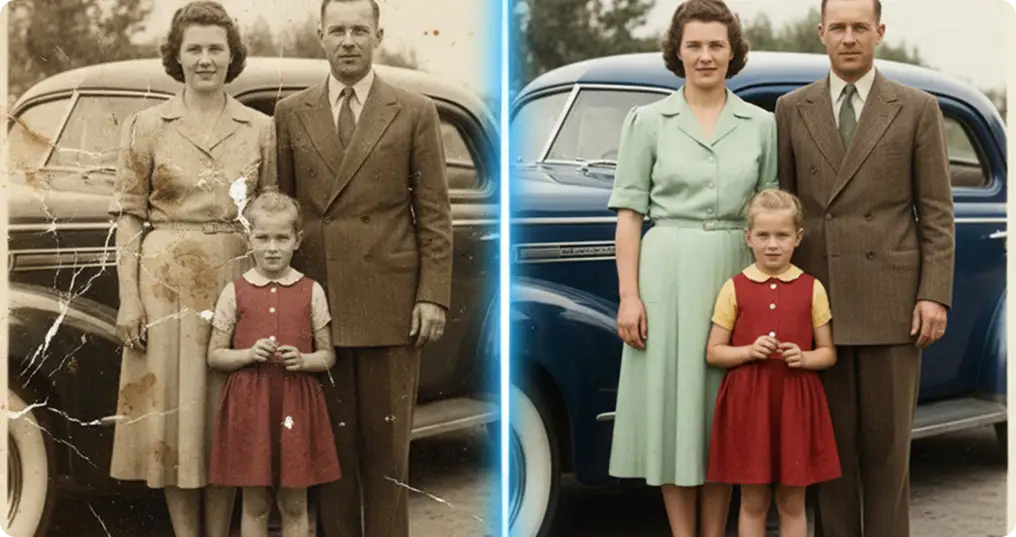
We all have that one image box tucked away in a closet, filled with dusty, crinkled photos of grandparents and childhood memories. Time hasn't been kind to them; colors have faded, corners are bent, and scratches have appeared out of nowhere. For a long time, fixing these meant hiring a pro or spending hours in Photoshop. But honestly? Who has time for that? The good news is that AI has changed the game. What used to take hours now takes seconds. You can turn a faded, black-and-white memory into a sharp, colorful photo instantly with Soloa.
How it works (It's easier than you think)
If you've never used an AI tool before, don't worry. It's genuinely easier than uploading a post to Instagram. Here is the step-by-step:
Step 1: Get Your Photo Digital First, get that photo onto your device.
Best option: Use a scanner if you have one.
Easy option: Just use your phone camera near a window with natural light to avoid glare.
Step 2: Open the Soloa Image Tools
Log in to your Soloa account. We've grouped all our visual tools in one place to keep things simple. From your main Dashboard, just look for the AI Image section.
Step 3: Select "Image Restoration"
When you click on AI Image, you might see the generator first. Look for the dropdown menu at the top. This is where the magic lives. You'll see options like Background Removal and Image Enhancer. Select Image Restoration. This activates the engine designed specifically to fix scratches, sharpen faces, and recover color.
Step 4: Upload and Restore
Click to upload your photo. The AI will immediately analyze it to fix tears, sharpen blurry faces, and even predict the original colors of the scene. Hit the button, give it a moment, and get ready for the "wow" moment. Seeing a grandparent look sharp and "real" in color for the first time is surprisingly emotional.
Related posts
See all posts